
New: BakerySuite Control Panel (CP)
Is everything running? You see it instantly.
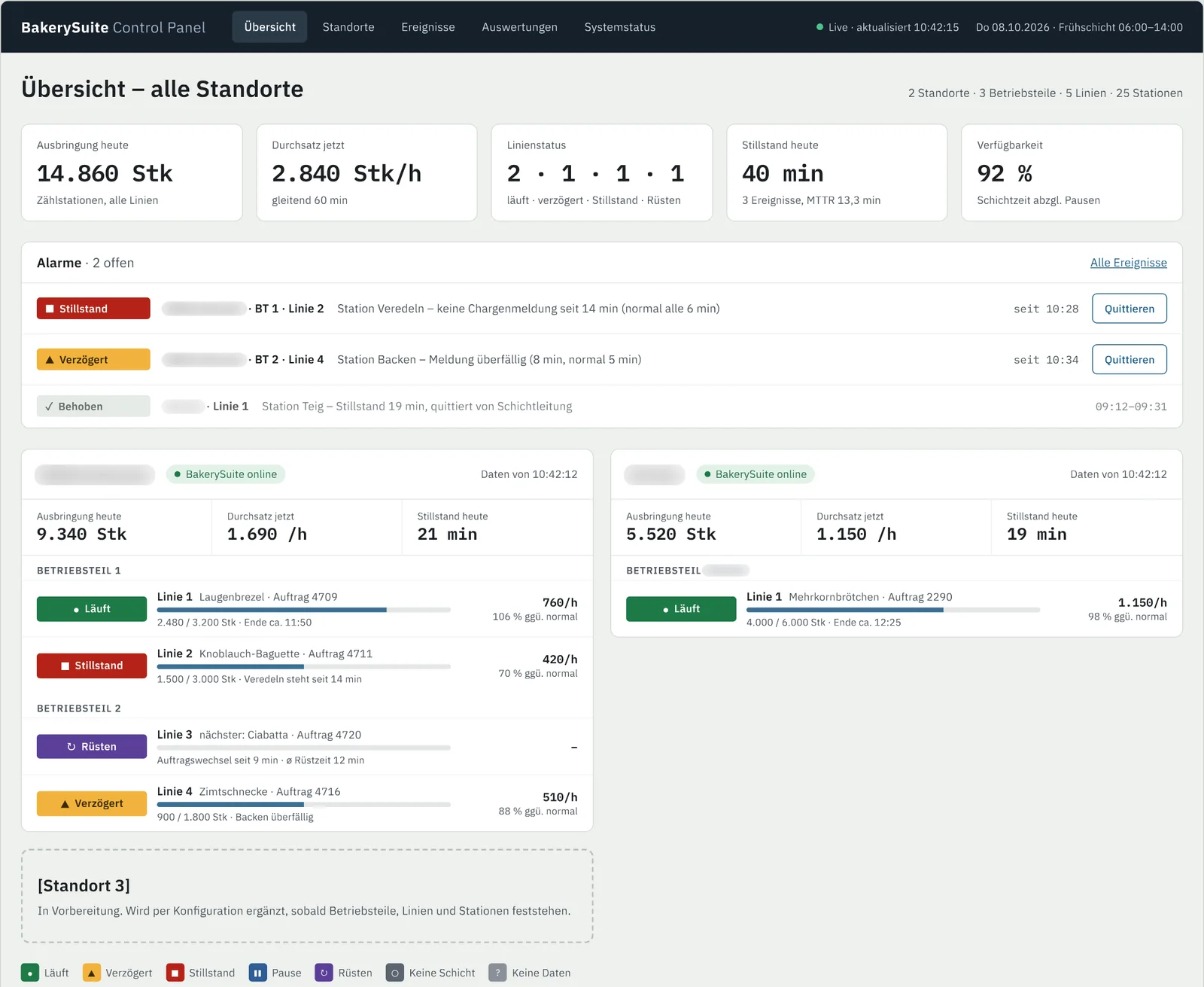
The BakerySuite Control Panel – BakerySuite CP for short – is the central web portal for your production. At its heart is the Cockpit: live access to all sites, production units, lines and stations – with stoppage detection, throughput, order forecast and emergency plan.
Three questions, one answer
The Cockpit answers what production managers really want to know.
The Cockpit is the dashboard of the Control Panel – the view that executives, plant managers and shift supervisors start their day with.
Is everything running?
Are the systems online, are the lines producing, are there stoppages? Status per site, line and station at a glance.
How well is it running?
Throughput, order progress, availability and changeover times – live and over the course of the shift.
Where do I need to step in?
Deviations and alarms, sorted by urgency – with acknowledgement showing who dealt with them and when.
From group level to station
Overview → site → line → order.
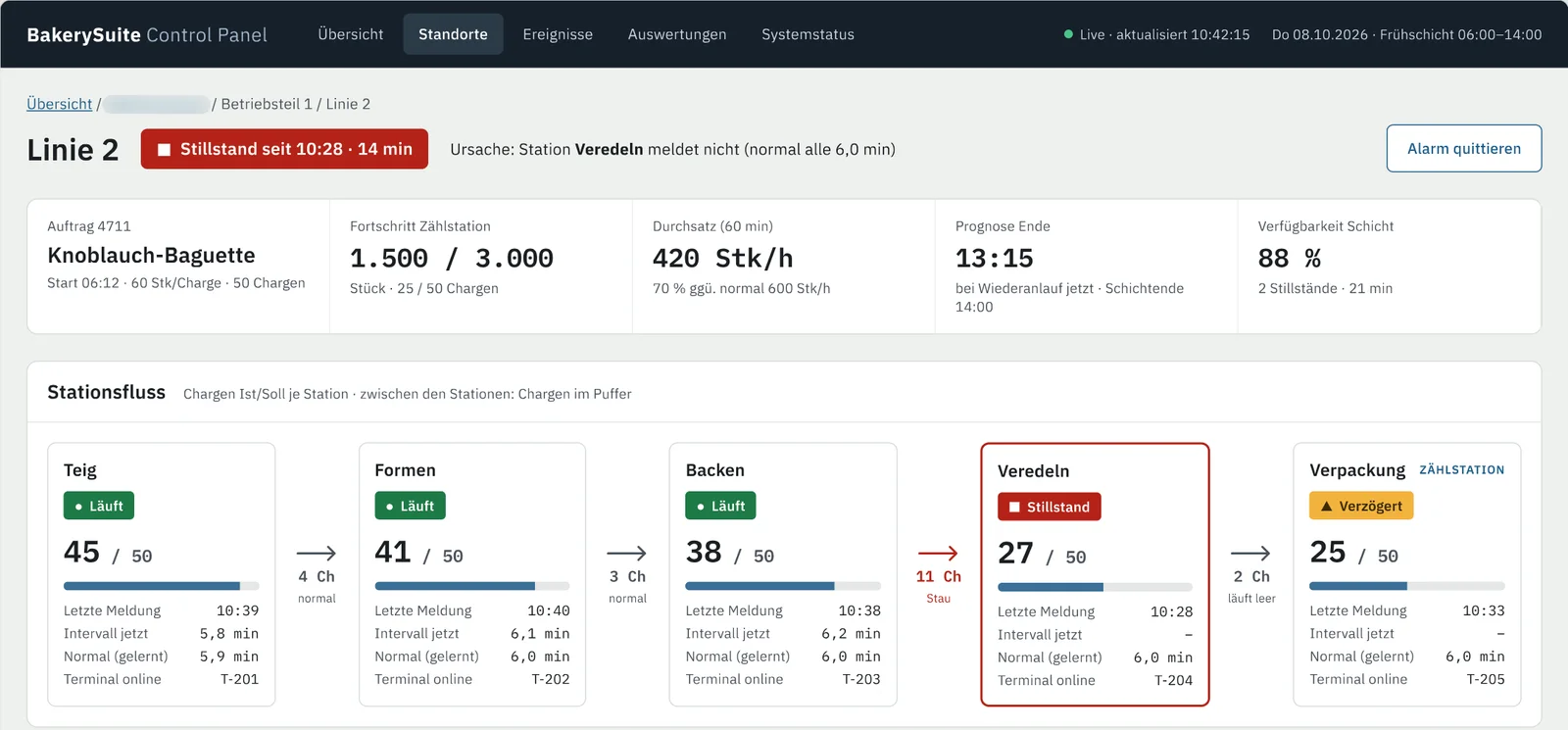
Start with all sites at a glance and drill down with a click: production unit, line, individual order. In the line view you see the progress of every station – and which station is currently the bottleneck.
For each line there is a forecast of when the running order will be finished and which queued orders can probably still be completed before the end of the shift.
- Progress per station with bottleneck marking
- Forecast for order completion and queue
- Status timeline with breaks, changeovers and stoppages
Features
What’s inside BakerySuite CP.
Learning stoppage detection
The Control Panel learns from history how long a work step usually takes per station and item – and detects delays and stoppages, even without stored target times.
Emergency plan
Shows instantly at which site, in which production unit and on which PLC a fault has occurred. Optionally – only if you want it and have enabled it – the PLC on site can be restarted directly via the CP.
Shop-floor monitor
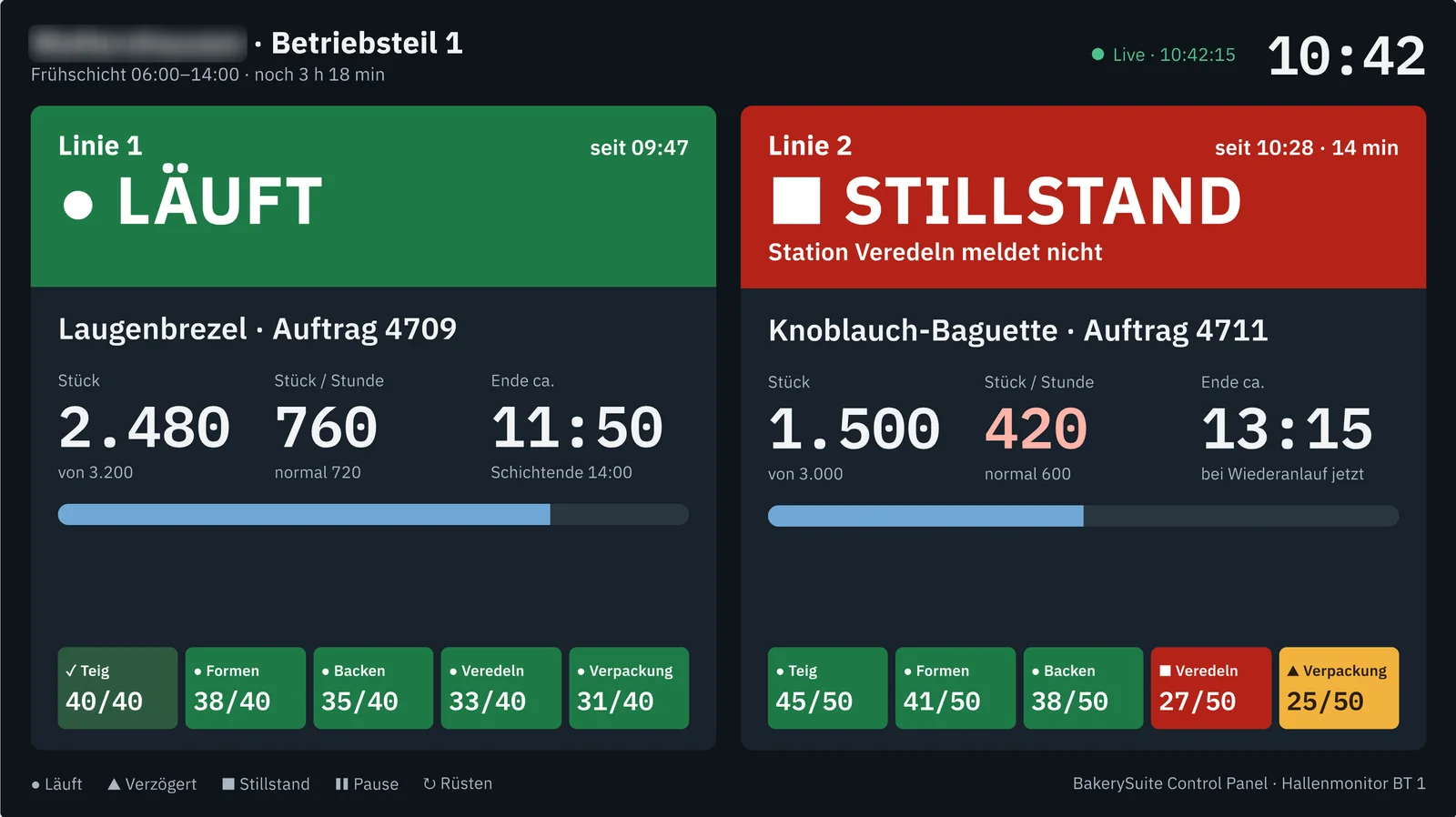
A dedicated wallboard view for large screens in the hall: a few very large figures, readable from several metres away, no operation required.
Honest live data
Every value has a timestamp. If the connection drops, the Control Panel shows “no current data” – never a frozen green status.
System status & administration
For IT and support: connection, BakerySuite status, database and terminals per site – and, in future, central administration of the BakerySuite servers.
Roles & permissions
Executives see all sites, plant managers and shift supervisors their own area – each with the appropriate permissions.
Shop-floor monitor
Your line status – big, clear, readable from metres away.
On large screens in the production hall, the shop-floor monitor shows what matters to the team: is the line running, how many pieces are done, when will the order finish – and which station has stopped.
It needs no operation, refreshes itself and clearly shows “No current data” if the connection drops, instead of a frozen status.
- Content configurable per monitor – plant section or single line
- Status never shown by colour alone, always with text and symbol
- Registered as a device, no user login required
Related
Frequently asked questions
What is the BakerySuite Control Panel?
The BakerySuite Control Panel (CP) is the central web portal of BakerySuite. It displays all sites, production units, lines and stations live – with status, throughput, order forecast, alarms, shop-floor monitor and emergency plan.
What is the difference between the Control Panel and the Cockpit?
The Cockpit is the dashboard of the Control Panel: the live overview of all sites and lines. Beyond that, the Control Panel includes line and order views, reports, shop-floor monitors, system status, configuration as well as roles and permissions.
How does the Control Panel detect stoppages?
Every station reports its completed batches. From history, the Control Panel learns the usual reporting interval per station and item. If a report is significantly overdue, the station is marked as delayed or stopped. Breaks and shift changes are taken into account.
What is the emergency plan?
The emergency plan shows exactly at which site, in which production unit and on which PLC a fault has occurred. If you want this and have configured it accordingly, the affected PLC can be restarted directly via the Control Panel – without this permission, the CP remains display-only.
Do I need to install anything on my computer?
No. The Control Panel runs in your web browser. Shop-floor monitors are registered as devices and display their view without a user login.
Can more sites be added?
Yes. New sites, production units, lines and stations are added by configuration – without any software changes.
Want to see your production live?
We’d be happy to show you the BakerySuite Control Panel in a personal demo.