
Weighing & scale integration
Weigh exactly to recipe. Documented automatically.
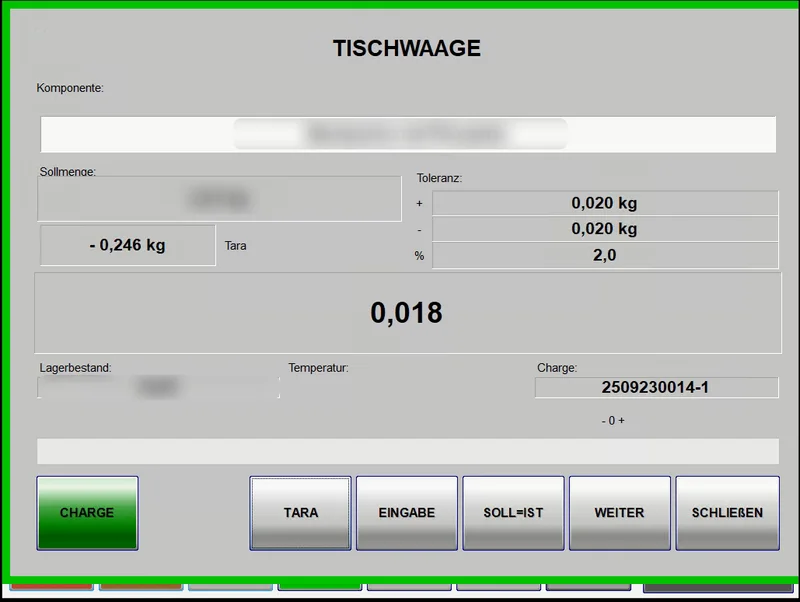
Connected scales deliver the weight directly into the recipe step. BakerySuite checks it against the target value and documents every weighing – no copying, no calculating. RHEWA scales are in use; other digital scales with an interface can be connected.
Features
Precision with every ingredient.
RHEWA & other scales
The weight is taken directly from the scale – not entered by hand. RHEWA scales are connected; other digital scales with an interface are possible.
Target/actual comparison
The target value from the recipe and the actual weight are shown side by side.
Tolerance check
If a quantity is outside the tolerance, the terminal flags it immediately.
Batch linked to weighing
Every weighing is linked to the raw material batch used.
Complete log
All weighings are stored and available in the reports.
Integrated in Touch
Weighing is part of guided recipe execution in BakerySuite Touch.
More features
Frequently asked questions
Which scales can be connected?
RHEWA scales are currently connected in live operation. In principle, any digital scale that offers an interface can be connected – we are happy to check your existing models.
What happens if the weight deviates from the target?
If the weight is outside the defined tolerance, the operator is alerted directly at the terminal.
See BakerySuite in your production.
We’ll call you back, discuss your requirements and show you what BakerySuite could look like in your bakery – with no obligation.